Project 8:Functions, Classes and Arcade Fun
Due: Friday Dec 15th at 11:59pm (The day after reading day)
Summary:
This time you will create a simple video game like program
Details:
long long ago there was a game called frogger
(which made a comeback about 5 years ago in the Retro
video game revival). You are going to write a simple frogger-like
game. (But not actual frogger!! be sure to
make it do the requirements below)
- First create your new project in pycharm with your name in the project
name
- Next add the arcade
library the same way that we used the arcade library in the past.
Now build a simple frogger like game with the following features.
- There should be three safe zones, one at the top, one at the bottom
and one in the middle. These are the green 'grass' areas in my example
picture below
- There should be a road, between the bottom and middle safe zones. This
is the gray area in my implementaiton
- There should be a river between the middle and top safe zones. this is
the blue area in the picture below.
- on the road there should be two sets of vehicles.
- one set moves left to right
- the other set moves right to left.
- the vehicles should be randomly spaced so that they don't overlap,
but the distance between each vehicle is randomized.
- the vehicles drive till they get to the edge of the screen and then
loop around to the other side of the window as they go off of the
screen
- On the river there should be two sets of turtles
- the turtles are also randomly spaced assuring that they don't
overlap.
- there are two sets, one going left and the other going right.
- as a turtle goes off of the window, loop it back around to the other
side of the window.
- if the player is riding a turtle that hits the edge of the window
and loops, then the player loses the game.
- The player is a frog
- the frog starts at the bottom safe area
- the frog wants to get to the top safe area
- if the frog gets to the top safe area it wins
- if the player/frog gets hit by a vehicle/truck, the player loses
- if the player goes into the water and not onto a turtle, the player
loses
- to make this work, move the player a big bit, maybe the size of
the player sprite each time.
- When the player rides a turtle, the player moves with the turtle
until the player jumps off.
- Winning
- if the player make it to the top safe zone and wins, inform the
player they have won and stop the game (easiest way to do this is to
not have update do anything
- Losing
- if the player collides with a vehicle, the player loses, stop the
game (again don't let update/on_update do anything. Report to the
player that the player has lost.
- Sounds
- play a sound if the player loses
- play a different sound if the player wins
- play a third sound when the player makes the frog move/jump.
Images: I have used the names of images that match the original frogger
(though it had more going on) You can use any other images you want so
long as
- They are appropriate for class
- They work the same way as the description above.
Be sure to include your pictures
and sounds in your github uploads
Extra requirement: Be sure to use functions
and/or methods. Each function/method should do only one thing, but any
one function/method should not be longer than 20 lines of python. (and
most should be shorter, most of mine were 10-15 lines.
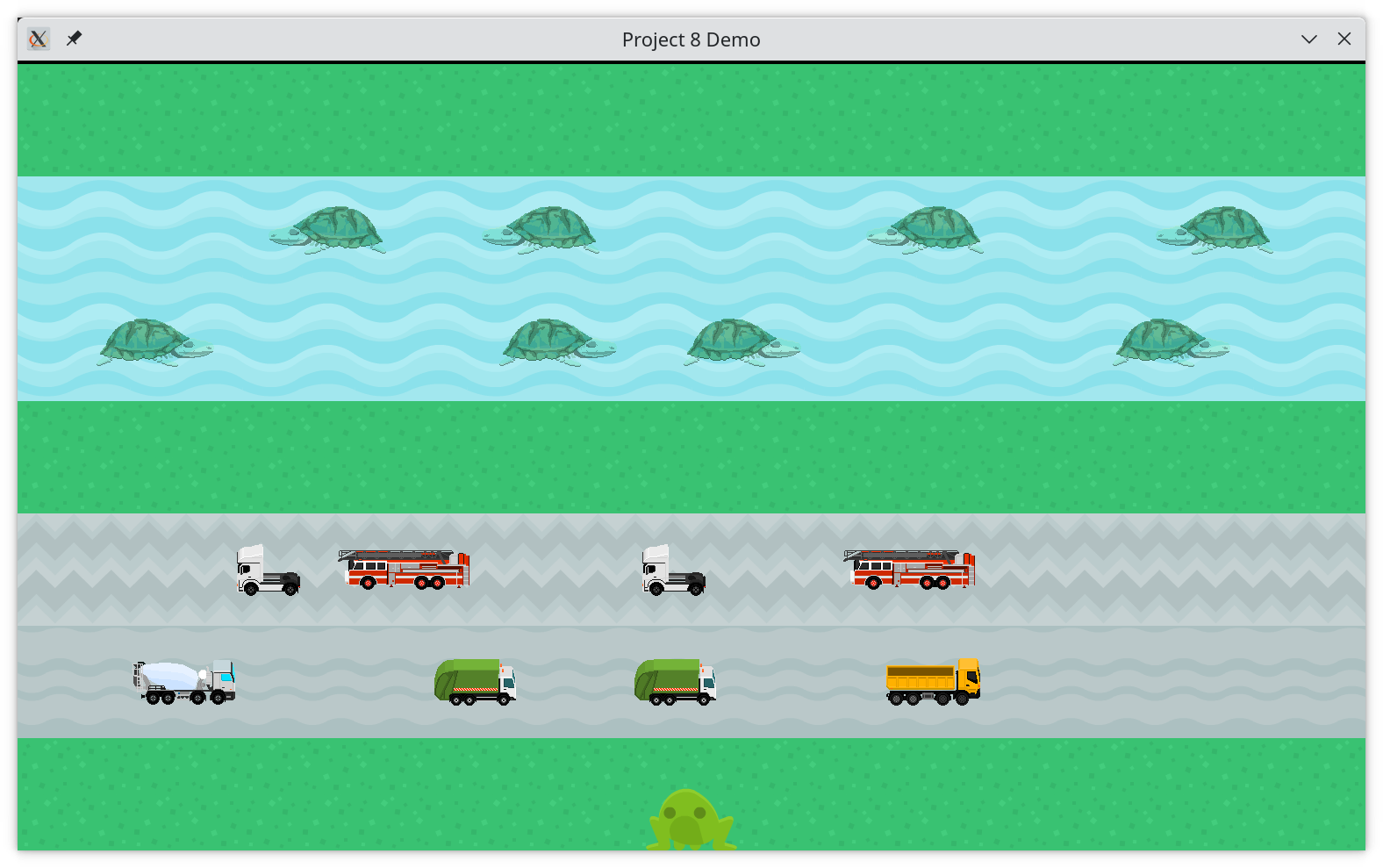
A still image of my instructor implementation:
Extra Credit:
if (and only if) you have completed the main requirements above, you can
do some of the tasks below for extra credit. Your extra credit (including
the extra credit and the work below) cannot make your project grade more
than 100% of the project credit, you still have to do well on the exams
and programming quiz)
- Lives (20 extra credit points)
- the player starts with three lives
- display the lives somewhere on the game
- instead of losing the first time the frog is hit by the truck, have
the frog start back at the bottom safe zone and reduce the number of
lives by one
- if the player runs out of lives, then the player loses and the same
effects as the original 'base' game above should apply.
- levels (30 extra credit points)
- display a score, which starts at 0
- if the player makes it to the top safe zone, add a fixed value
to the score, then move to the next 'level'
- to move to the next level
- move the player to the bottom safe zone again.
- change some of the vehicles being show and change their speed
- change the distance between turtles, and change their speed.
Of course put this into git and onto github sooner rather than later.
Additional requirements:
- Your code must be commented. you don't have to comment every line,
but you need to explain to me what you are doing in the code.
- You must use functions and methods as instructed above, no method can
be more than 25 lines of python and most should be quite a bit less.
- Write a readme file with directions on how to play your game. This
file must include
- your name
- anything you didn't quite get done
- directions on how to play your game
- a description of any extra credit you (tried to) implement(ed)
Submission:
As with the previous project, to submit
the project to me, share it with me on github. My github id is jsantore.
You can see directions for doing this here.